

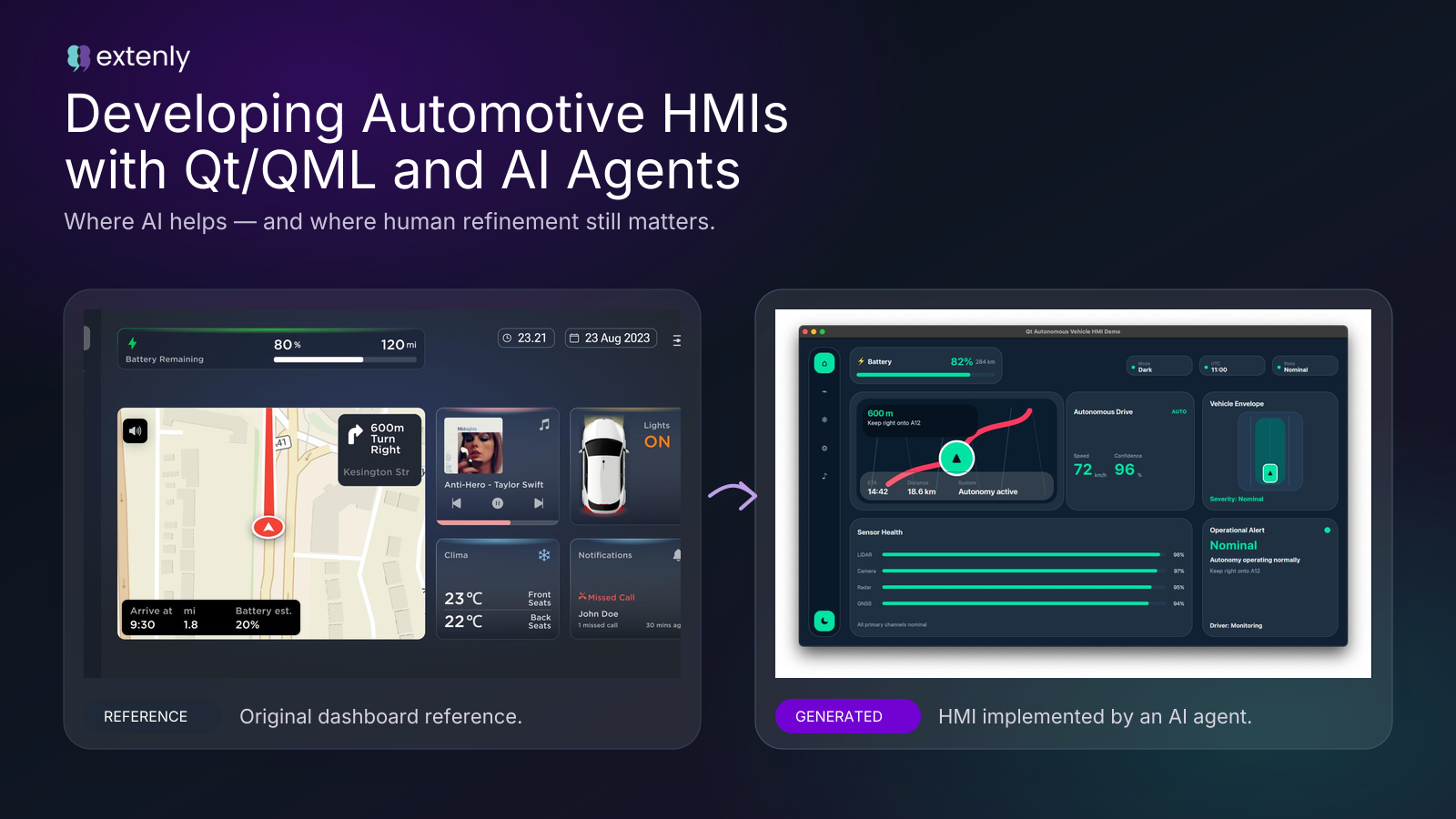

AI coding agents are becoming part of modern software development workflows. They can generate code, create project scaffolds, write documentation, and help teams move from idea to prototype faster than before.
But speed is not the same as production readiness.
To evaluate this in a realistic context, we gave an AI coding agent a Qt/QML UI implementation task: build an autonomous-vehicle-style HMI proof-of-concept.
This evaluation was done specifically with an AI coding agent running through OpenClaw, using Codex as the coding model. The results should be read in that context. This is not a universal benchmark of every AI coding tool or every model, but a practical case study of what happened in this setup on a realistic Qt/QML UI task.
The result was useful, but not in the way people often expect from AI coding tools.
It showed that AI agents can be very effective for quickly producing a first prototype. It also showed that when the work requires design fidelity, QML architecture, responsiveness, performance awareness, and maintainable implementation, human Qt/QML expertise is still essential.
The assignment
The task was to create a simulated autonomous vehicle cockpit/HMI using:
- C++
- Qt 6
- QML
- CMake
The HMI needed to represent several operational scenarios:
- normal autonomous driving
- driver takeover request
- sensor degradation
- obstacle or hazard detection
- emergency / fallback state
- diagnostics / status state
- dark and light visual themes
The task was not only to draw a dashboard. The implementation was expected to follow supplied visual references and create a structured Qt/QML prototype that could support a realistic discussion about UI, state handling, and implementation quality.
The goal was not production vehicle software. This was a proof-of-concept only, not safety-certified, not validated vehicle software, and not suitable for real autonomous driving or safety-critical control.
But even for a proof-of-concept, we expected the implementation to respect the supplied design and show reasonable Qt/QML structure.
The starting point: two reference designs
Before implementation started, we gave the agent two visual reference designs: one in dark mode and one in light mode.
These were not late-stage inspiration images. They were part of the original task.
The goal was to reproduce the supplied designs as closely as possible in Qt/QML. This was not a loose inspiration exercise. The agent was expected to translate the reference screens into an implementation with matching layout, proportions, spacing, hierarchy, theme behavior, and visual detail.
It did not achieve that.
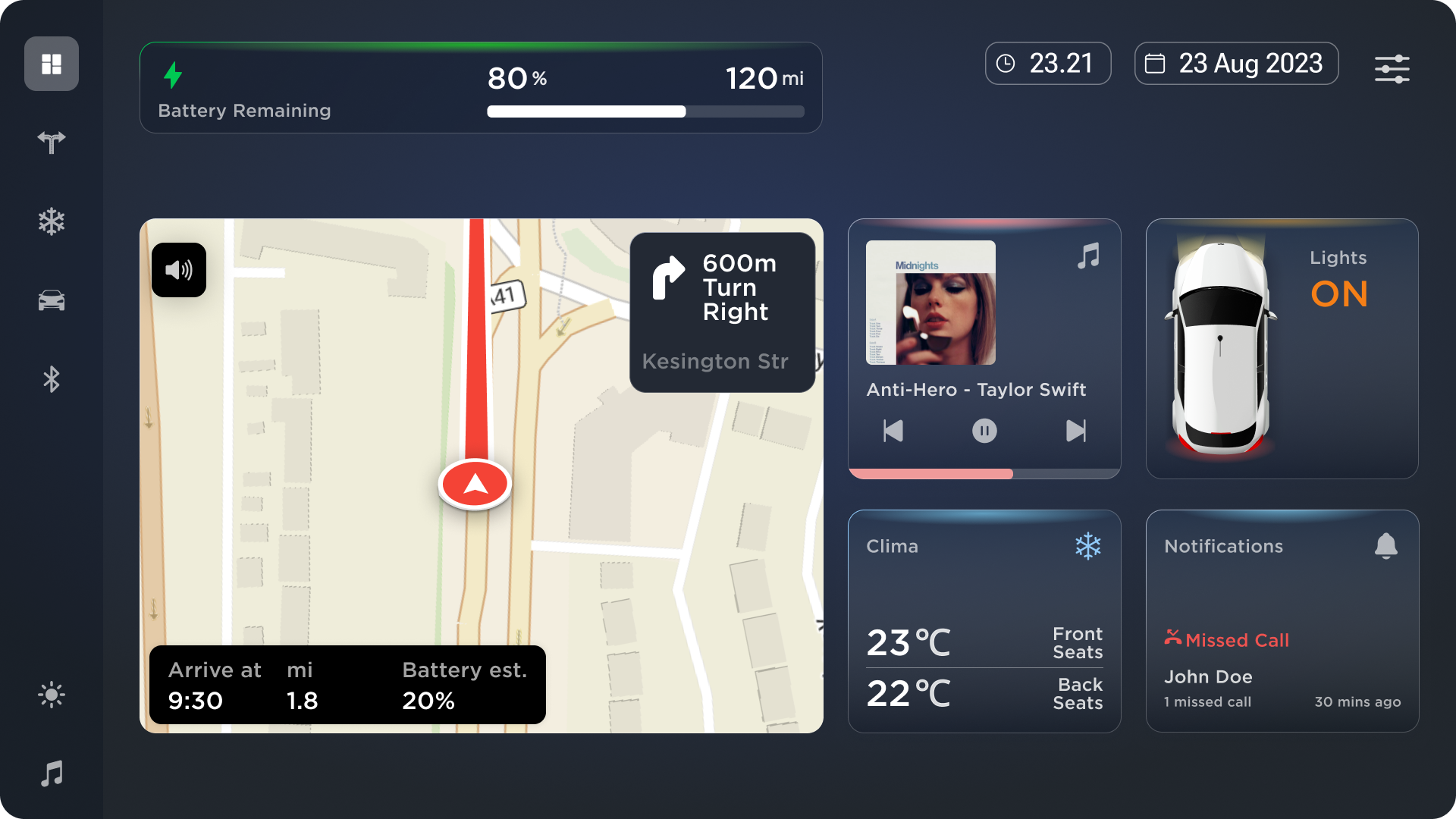
The dark-mode automotive HMI reference provided to the AI agent before implementation began.
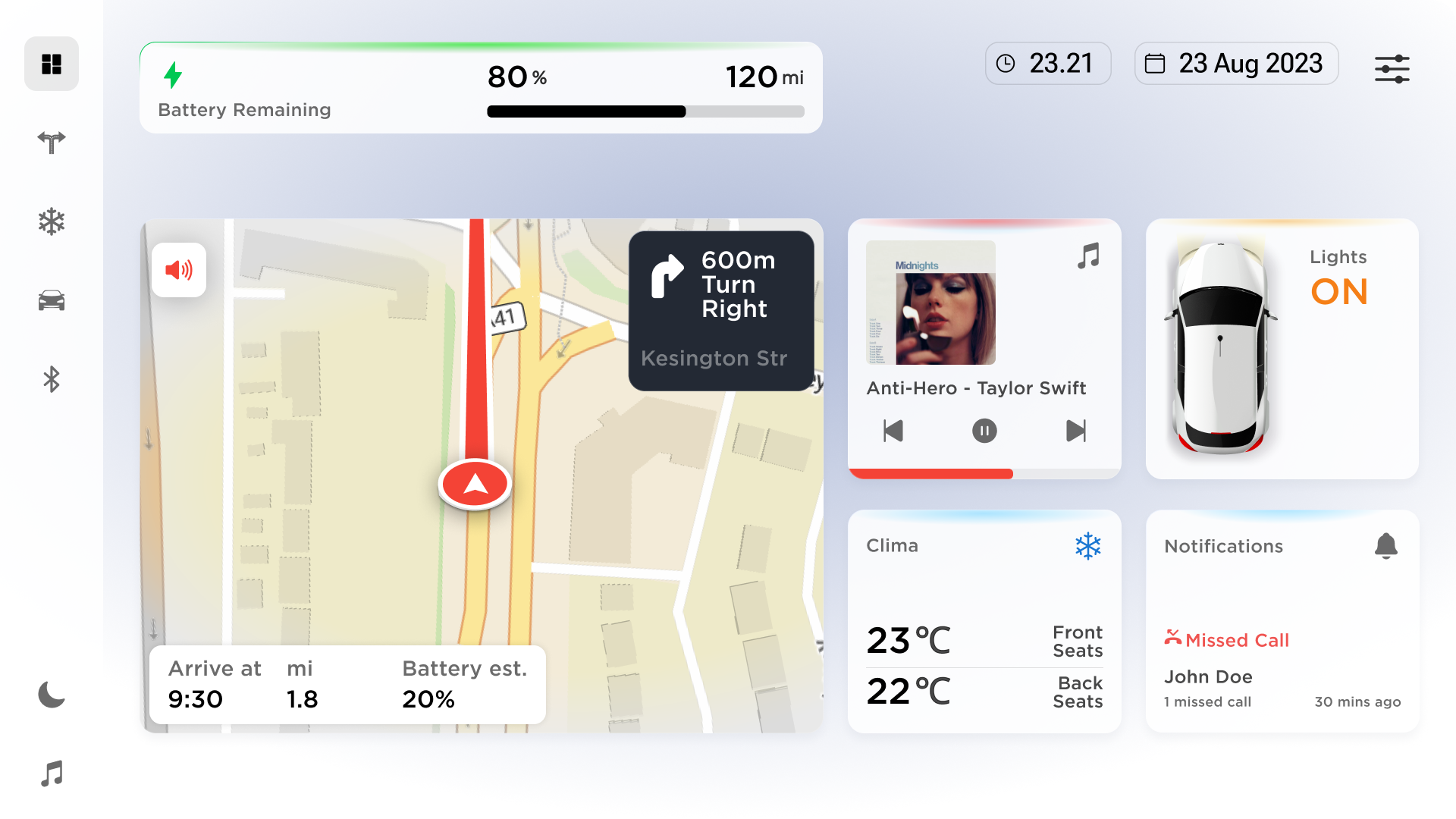
The light-mode version of the same reference design, also provided before implementation began.
The references showed a polished automotive dashboard concept with:
- a persistent vertical navigation rail
- a large central navigation/map area
- a top battery/status area
- supporting cards for vehicle functions
- rounded surfaces
- strong spacing rhythm
- clear dark/light theme parity
- a premium automotive visual style
A proper implementation would need to decompose those references before coding: grid, proportions, spacing, typography, card system, icon treatment, color tokens, shadows, and responsive behavior.
That did not happen.
What the agent produced
The agent quickly generated a working Qt 6 / C++ / QML project which included:
- a Qt application entry point
- a QML dashboard
- simulated autonomous driving states
- dark and light theme support
- dashboard cards
- sensor health indicators
- operational alert states
- documentation and milestone notes
From a prototyping perspective, this was useful as in a short time, we had something that could run and be reviewed.
The generated UI was visually coherent at first glance. It had a sidebar, a map-like panel, cards, rounded surfaces, status indicators, and dark/light themes.
But that is where the distinction starts.
It looked like an automotive dashboard and it did not look like the provided design.
The visual fidelity problem
The first major issue was visual fidelity.
The generated UI captured the broad category of the references: an automotive dashboard with a sidebar, map area, cards, rounded surfaces, and dark/light theme support.
But it did not capture the actual design system.
The references had a carefully balanced layout, clear proportions, consistent card rhythm, refined spacing, deliberate typography, polished shadows, and strong dark/light parity. The generated implementation replaced much of that with generic dashboard assumptions.
This distinction matters.
A UI can look plausible and still not follow the design. In this case, the prototype looked coherent at first glance, but it was not a faithful implementation of the supplied references.
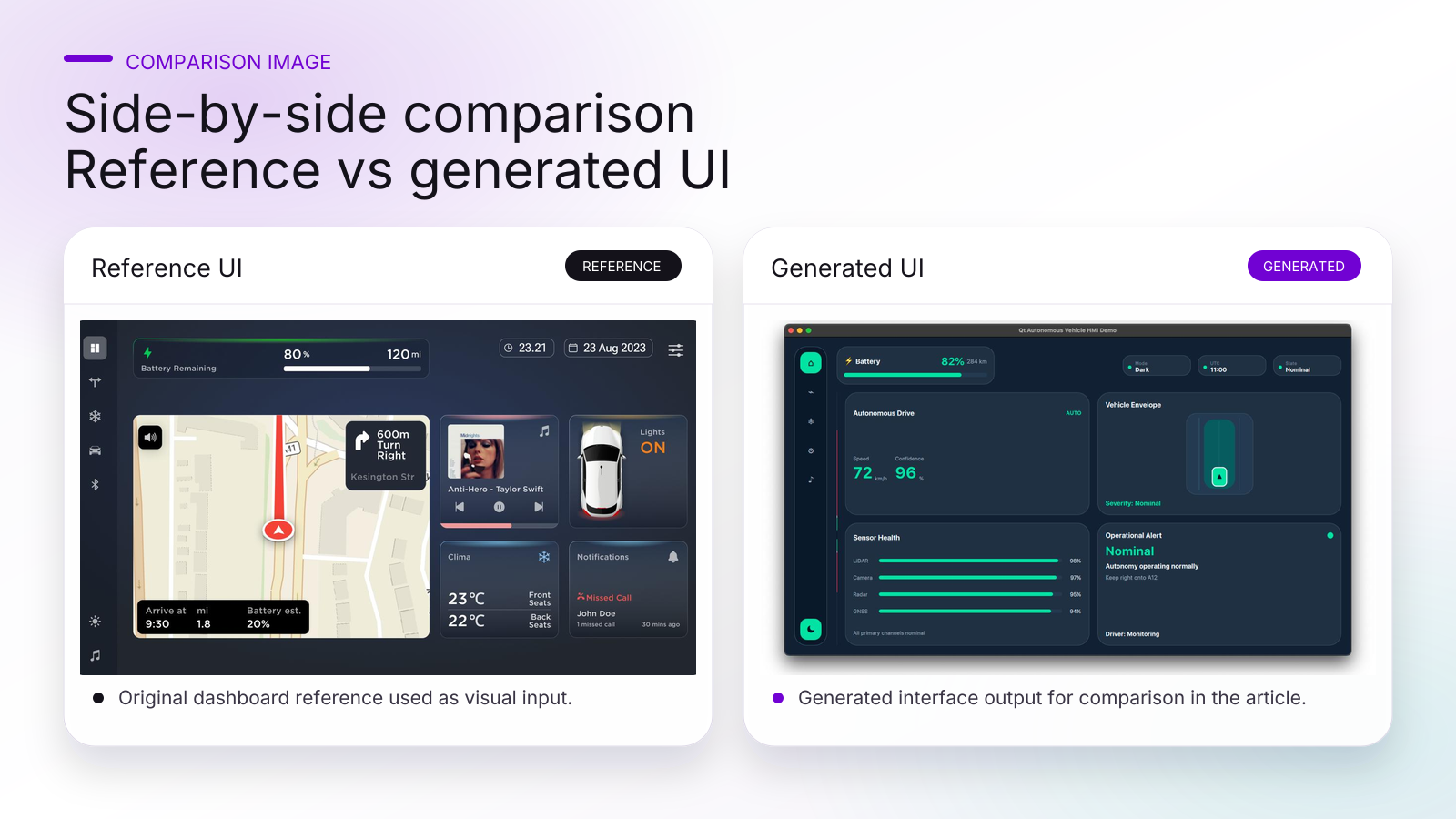
The generated UI captured the general category of an automotive dashboard, but missed the layout precision, proportions, spacing, and visual system of the supplied reference design.
The agent later documented this failure correctly in the project report. It acknowledged that the references were available before implementation and should have been treated as visual targets, not broad inspiration.
That is an important point: the issue was not that the agent lacked reference material. The issue was that it did not properly use it.
The QML architecture problem
The bigger issue was architectural.
The generated QML had almost no real UI architecture. Most of the implementation lived in one large QML file. State data, visual components, JavaScript logic, layout structure, and styling were all mixed together.
For a quick prototype, this can be acceptable, but for production Qt/QML work, it is a serious problem.
The generated implementation had several maintainability issues:
- too much logic in a single QML file
- simulated state stored directly in QML
- JavaScript behavior embedded alongside UI structure
- inline components instead of a scalable component hierarchy
- weak separation between state, presentation, and visual components
- limited maintainability
- poor scalability
Architecture was part of the task but the output did not meet that expectation.
A more production-oriented Qt/QML implementation would separate:
- application shell
- theme tokens
- reusable primitives
- navigation rail
- map/navigation panel
- status cards
- alert components
- sensor components
- vehicle state model
- C++ state provider or presentation model
In a real system, QML should not own operational truth, it should present validated state coming from a separate domain or C++ presentation layer.
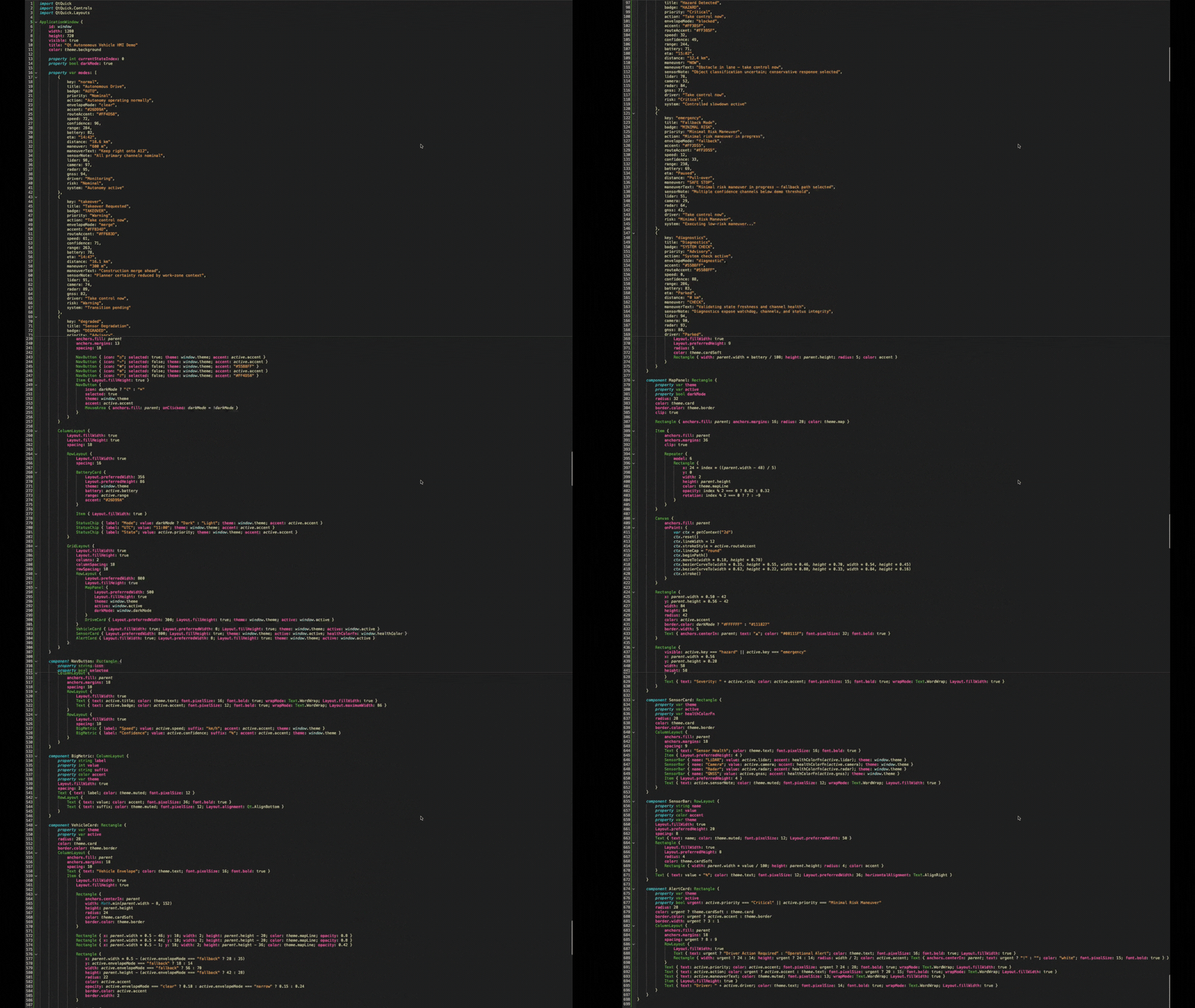
The generated implementation concentrated state, JavaScript logic, layout, styling, and components inside one large QML file. This is acceptable for a throwaway prototype, but not for scalable Qt UI development.
The layout and responsiveness issues
The generated interface was effectively designed around a fixed 1280×720 display. It was not responsive in a production sense.There were also questionable layout combinations, for example using layout fill behavior and preferred sizing in ways that made the sizing contract unclear.
One issue was especially revealing.
The generated UI showed two thin unwanted vertical lines on the left side of the right-hand card area. We asked the agent to remove them.
The agent repeatedly guessed at the cause.
It treated the problem as if it came from child visual elements: card borders, clipping, decorative lines, the vehicle envelope, or map decoration.
But the actual problem was the map/layout implementation bleeding into the card area.
A human Qt/QML developer looked at the generated code and fixed the issue in less than five minutes.
That was one of the clearest findings in the whole exercise.
The agent was fast at producing plausible changes, but it was slow at understanding the actual QML layout relationship causing the bug.
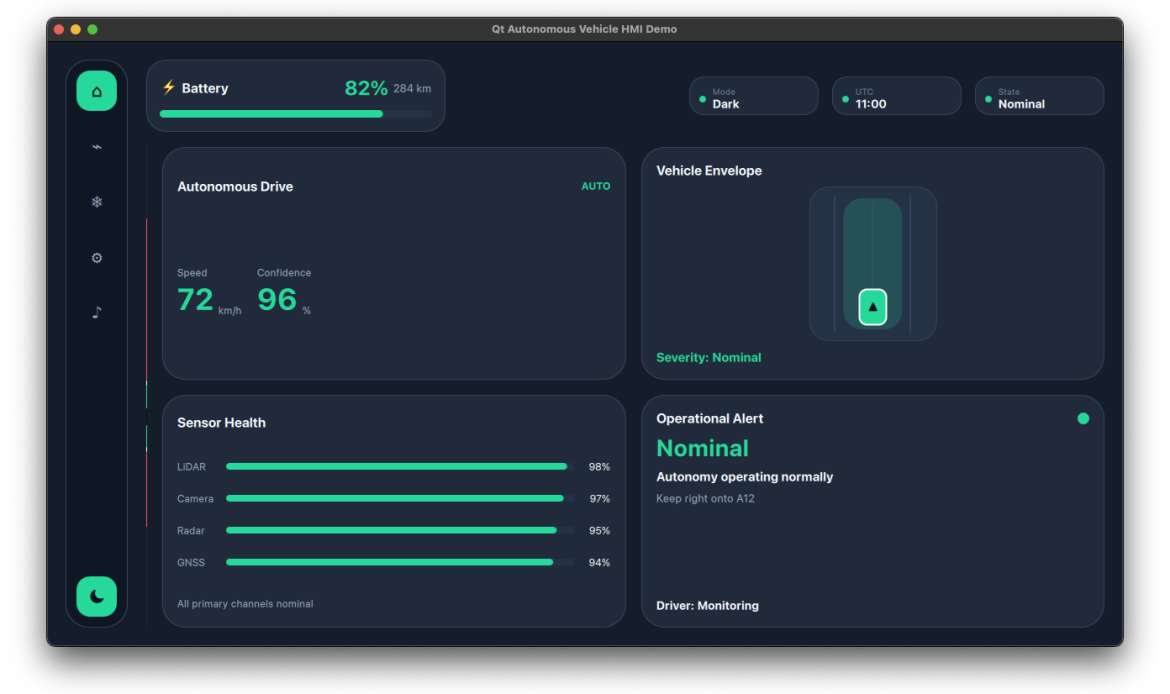
The generated UI showed two unwanted vertical lines near the card area. The agent tried several visual fixes before the real cause was identified as a layout/map implementation problem.
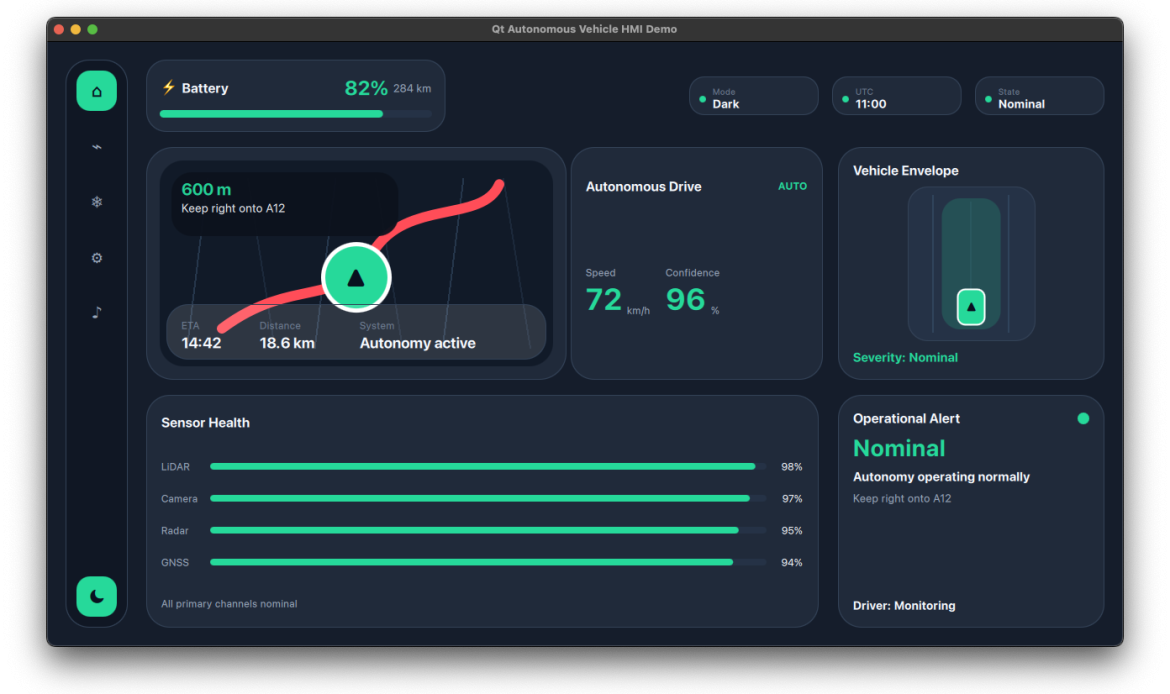
The corrected version after human review and layout fix. The issue was not a decorative element, but a layout implementation problem
This matters because debugging is not only about changing code. It is about understanding the system.
In UI work, especially with QML layouts, a plausible fix is not enough.
The performance and QML idiom issues
The generated implementation also showed QML performance and idiom issues.
One example was the use of Rectangle as a generic wrapper element.
In QML, Rectangle is a visual item. If an element is only needed as a container and does not need a background, border, or visual appearance, Item is more appropriate.
Using unnecessary visual items increases scene graph work and can hurt performance, especially on embedded hardware.
This may not matter in a small desktop demo. But in embedded UI or automotive-style interfaces, these choices matter.
They affect:
- rendering performance
- memory usage
- scene graph complexity
- maintainability
- debugging
- scalability
Again, this is the difference between prototype code and production-oriented Qt/QML. A human Qt/QML developer would usually notice and clean this up during architecture and performance review.
The tooling and verification issue
There was also a process issue.
The original execution environment did not have the required Qt/CMake tooling installed. The agent initially treated that as a blocker and continued with static inspection and generated documentation captures.
Later, the project report documented this as a failure.
A better agent should have checked whether the required packages were available, whether installation was possible, and whether approval was needed.
The lack of a proper build/run loop contributed to the poor debugging experience. Without running the application and comparing screenshots reliably, the agent leaned too much on static code inspection and pattern matching.
For UI work, that is not enough.
You need to see the result, you need runtime screenshots, you need visual comparison, you need to verify whether a fix actually fixed the problem.
What worked well
It is important to be fair: the agent was not useless.
It was useful for early prototyping.
It quickly produced:
- a working Qt/QML project
- a visible HMI prototype
- simulated vehicle states
- dark and light themes
- basic state-driven UI behavior
- documentation
- milestone notes
- a concrete artifact for review
For early exploration, internal discussion, or a throwaway prototype, this kind of speed can be helpful.
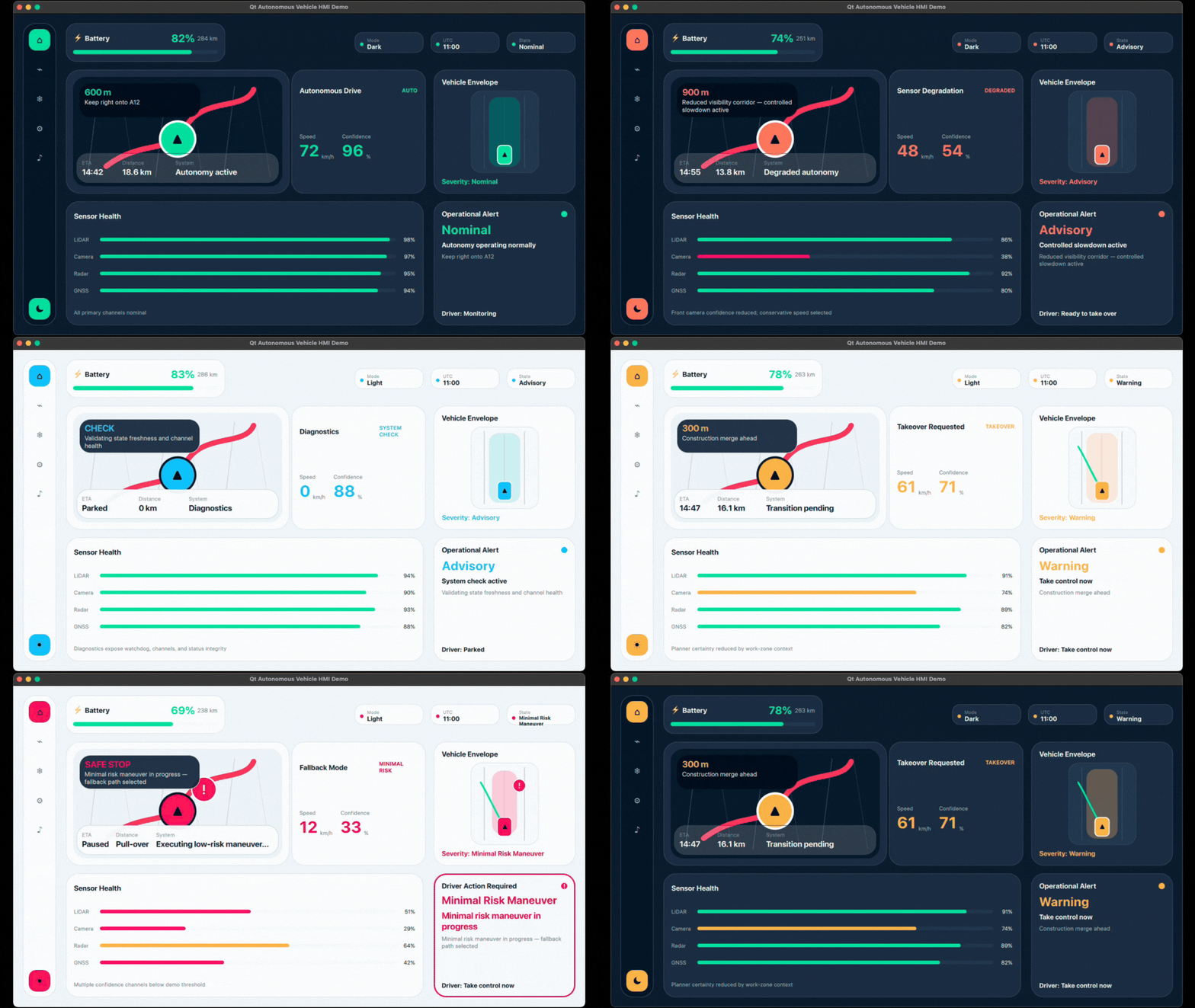
Final runtime demo showing multiple autonomous driving states and UI feedback modes.
The final prototype is good enough to explain the concept however it is not good enough to be considered production-ready Qt UI.
What did not work
The main problems were not small polish issues, they were structural.
The agent failed or struggled in areas that matter deeply for real Qt/QML UI work:
- visual fidelity to supplied designs
- QML architecture
- maintainability
- scalability
- responsiveness
- layout discipline
- performance awareness
- debugging accuracy
- runtime verification
- separation of UI and logic
The output was useful as a prototype, but it would not be a good foundation for production development without significant human refactoring and that is the key lesson.
The missing ingredient: discipline
After the implementation, we asked the agent to reflect briefly on how development with Qt/QML felt for this task.
It answered:
Developing with Qt/QML for this task felt powerful but also unforgiving. QML made it quick to build a state-driven, animated dashboard with reusable visual components, theme tokens, and live property bindings, but the layout system exposed gaps in my understanding: RowLayout, GridLayout, fillWidth, and preferredWidth require more discipline than generic web-style layout assumptions. I felt Qt was capable and well-suited for HMI work, but my use of it was too shallow in places; I moved quickly, produced plausible UI, and underestimated how much precise Qt layout knowledge and runtime verification were needed.
This became one of the most useful observations from the whole exercise.
Embedded systems, C++, Qt, and QML reward discipline. They require careful architecture, clear ownership, predictable layout rules, performance awareness, and verification. These are not optional details. They are what make the difference between a prototype that runs and software that can be maintained, scaled, debugged, and trusted.
That discipline is exactly where the AI agent struggled.
The agent could move quickly and produce something plausible, but it did not consistently apply the engineering discipline needed for production-oriented Qt/QML work. It mixed layout strategies, concentrated logic in one file, underestimated runtime verification, and treated visual fidelity too loosely.
This does not mean humans are perfect. Human developers make mistakes too. But experienced developers bring accumulated discipline: knowing when to slow down, when to separate architecture from presentation, when a layout usage is wrong, when a visual implementation is drifting from the design, and when a quick fix is only hiding a deeper problem.
For this case study, that may be the core lesson: AI can accelerate output, but discipline still has to come from the development process, and today, that process still needs experienced human ownership.
The budget question
There is also a practical budget question.
At this point, we are not convinced that spending tokens and review time on this kind of Qt UI implementation is necessarily more budget-friendly than hiring the right human Qt/QML developers from the start.
For production-oriented Qt/QML UI work, we would currently lean toward the latter.
The reason is not that AI has no value, it does. The reason is that the initial speed advantage can disappear quickly when the generated code requires significant review, correction, refactoring, debugging, and architectural cleanup.
If the goal is a quick prototype, the AI agent can help.
If the goal is production-quality Qt/QML implementation, the total cost of using an agent has to include not only token usage, but also the human time required to verify, correct, reshape, or in some cases rewrite the output from scratch.
How we think AI should be used here
AI agents can increase productivity when used for the right parts of the process:
- quick prototypes
- exploration
- scaffolding
- documentation drafts
- alternative implementation ideas
- simple repetitive tasks
- first-pass experiments
But they should not be treated as a budget-saving replacement for the right human expertise when the expected result is production-quality UI.
In Qt/QML work, the difference between a working screen and a maintainable UI architecture is significant.
AI can support the process, but experienced human ownership still has to define the architecture, review the implementation, and decide when the output is good enough for the intended use.
Final conclusion
This experiment showed both sides of AI-assisted UI development.
Using an AI coding agent through OpenClaw with Codex, we were able to create a working Qt/QML HMI prototype very quickly. The agent generated a project, implemented multiple simulated vehicle states, added dark and light themes, and produced documentation around the work.
That is useful but the implementation also showed the limits clearly.
The final result was not close enough to the original design references, even though those references were provided before implementation began and the goal was to reproduce them closely. The QML structure was not production-oriented. The implementation mixed layout approaches, embedded too much logic in the UI layer, showed weak responsiveness, used questionable QML patterns, and required human intervention to fix a simple layout issue.
For Qt UI development, our conclusion is clear:
AI coding agents are useful for prototyping when speed matters more than code quality. They are not yet reliable for production Qt/QML implementation where architecture, responsiveness, performance, maintainability, scalability, debugging, and design fidelity matter.
We should see AI as a productivity tool, not as a replacement for experienced developers or as a guaranteed way to reduce budget while expecting the same results.
The prototype helped us move fast, however, the human review showed why moving fast is not enough.
For embedded UI work with C++, Qt, and QML, speed only becomes valuable when it is combined with engineering discipline.